Testimonials for Website: How to Collect and Display Them
How to collect, choose, and place testimonials on your website so they build trust and help visitors decide to buy.
In this article
Your homepage might look polished, your product pages might be clear, and your CTA buttons might be in all the right places, yet the conversion still feels stuck. In a lot of teams, the missing piece isn't another headline swap or a new color on the button, it's trust. Buyers want proof from real people, and if that proof is thin, scattered, or hard to find, they hesitate.
That's why testimonials for website work best when they're treated as a system, not decoration. The goal is to build a testimonial engine that collects the right stories, manages them without chaos, and displays them where they can move decisions. Done well, that engine becomes part of your growth stack, not a side project that sits in a forgotten page footer.
Why Your Website Needs More Than Just a Few Good Quotes
A lot of sites have the same quiet problem. The brand story is strong, the design is clean, but the visitor still can't answer the only question that matters, “Will this work for me?” That gap shows up most clearly on pricing pages, product pages, and landing pages where visitors are already close to action but still need a reason to believe.
The first few pieces of social proof matter more than people expect. PowerReviews reported that exposure to a product page with 1 or more reviews lifted conversion by 52.2%, that pages with 11 to 30 reviews converted at more than 2x the rate of pages with 0 reviews, and that products with 101 reviews or more saw conversion increase by over 250% (PowerReviews review volume impact). That pattern tells you something practical, the jump from zero proof to some proof is often the biggest trust shift.
For that reason, a testimonial page alone usually isn't enough. The smarter move is to place a few strong testimonials on high-intent pages, then keep a central library behind the scenes so the same proof can be reused across the site, sales pages, and follow-up emails.
Practical rule: if a page is designed to trigger a decision, it should not have to rely on brand claims alone.
A complete testimonial engine solves the workflow problem too. It keeps feedback from living in inboxes, Slack threads, and random screenshots, then turns it into something searchable, publishable, and useful. That's where testimonial strategy starts to become operational instead of cosmetic.
Planning Your Testimonial Strategy
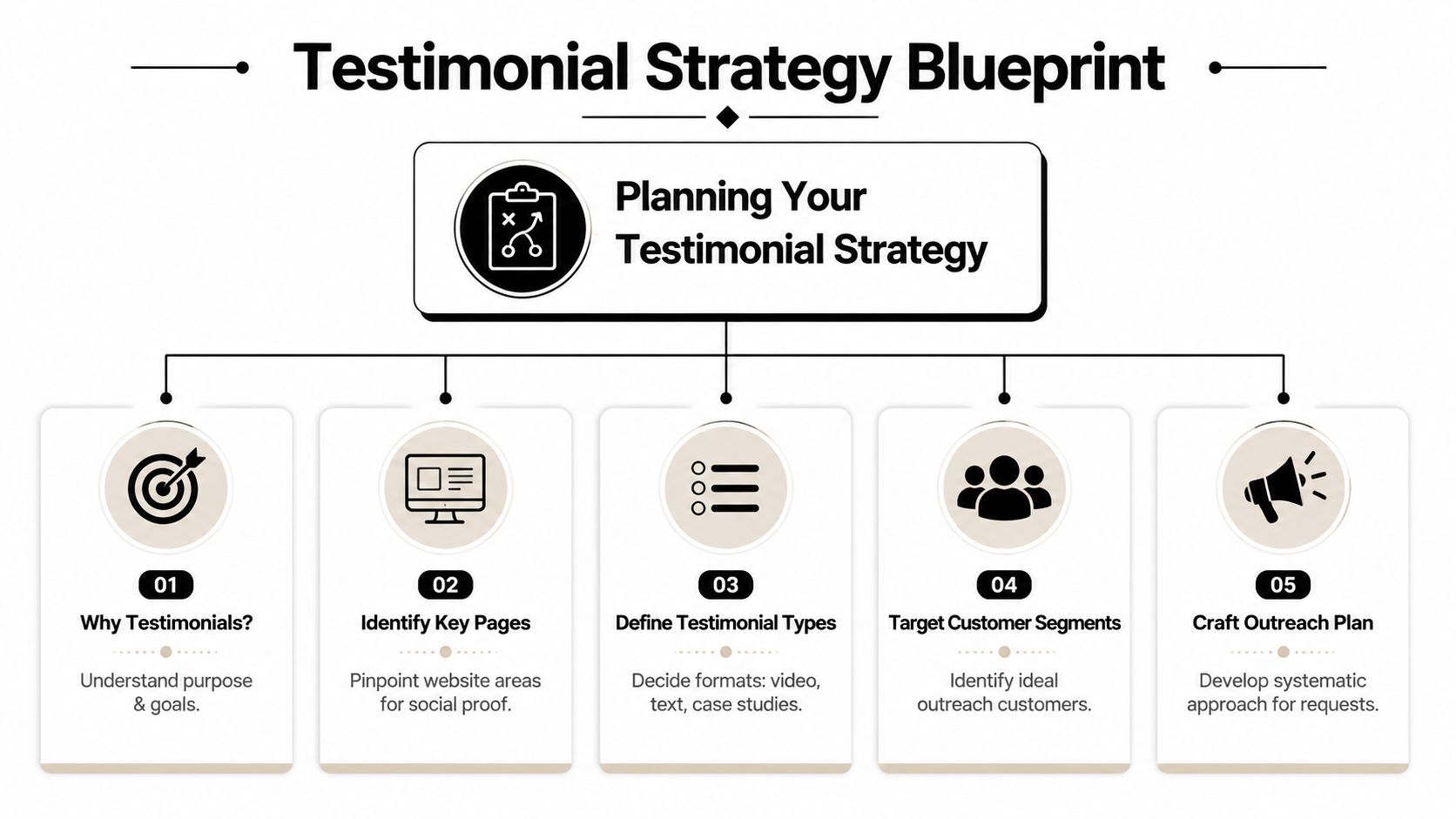
The easiest testimonial programs to scale begin with focus. Before you ask for anything, identify which pages have the biggest trust gap, which customer segments are most persuasive, and which testimonial formats fit the way those visitors scan a page. A founder-led SaaS demo page doesn't need the same proof as a local service homepage, and a product detail page doesn't need the same story as a case study page.
Start with the pages that need trust most
Pricing pages, checkout pages, and product pages usually deserve first attention because they're closest to revenue. If a visitor is hesitating there, it's rarely because the copy is too short. It's because the page hasn't answered the risk question well enough.
Match the testimonial type to the page. Short text quotes work well when the visitor needs a fast signal, while richer media makes sense when the offer is more considered or the explanation is more complex. LaunchWall summarized research showing that adding a video testimonial to a landing page can increase conversion rates by up to 80%, and testimonials with a reviewer photo can perform 35% better than text-only testimonials (LaunchWall social proof statistics).
Define what a “good testimonial” means for your team
A good testimonial is not just positive. It should answer a buying objection. For one audience, that objection might be speed. For another, it might be implementation ease, support quality, or consistency of results.
Use customer pain points as your filter. If your product is technical, ask for proof that speaks to onboarding or clarity. If your service is emotional or high trust, ask for language that reflects relief, confidence, or reassurance. The more specific the story, the more reusable it becomes.
Set the program up for reuse
The best testimonial systems are built for reuse across multiple channels. You want one story that can become a homepage quote, a landing page clip, a sales follow-up snippet, or an FAQ answer. That only works if you collect it with future reuse in mind.
A simple planning habit helps here.
- Map the page: pick the page with the highest hesitation.
- Pick the proof type: choose text, photo-backed quote, or video.
- Pick the persona: request feedback from the customer profile closest to your ideal buyer.
- Pick the outcome: decide which objection the testimonial should address.
- Pick the destination: define where the finished asset will appear first.
That structure keeps the program aligned with revenue instead of making it a loose collection of nice comments.
Collecting High-Impact Customer Stories
The collection phase is where many organizations lose momentum. They wait too long, ask vague questions, or make the customer jump through unnecessary steps. The fix is simple, lower the friction, narrow the prompts, and request the story while the result is still fresh.
Ask while the outcome still feels real
Send the request right after the win. That gives the customer a clear moment to react to, instead of forcing them to reconstruct the experience later.
The same logic applies whether you're asking after onboarding, support resolution, delivery completion, or a milestone achievement. Don't wait until the memory turns broad. People describe specifics when the experience is still concrete, and those specifics are what make the story useful on a website.
Use formats that customers can finish quickly
For video, browser-based recording is the cleanest path because it avoids app downloads and logins. Keep the recording short, allow it on mobile or desktop, and make the finish line obvious. A short recording window works better because customers can complete it without overthinking every word.
For written feedback, structured forms work better than empty boxes. A useful prompt sequence is simple:
- What problem did you have before?
- Why did you choose us?
- What changed after using the product or service?
- Would you recommend us, and to whom?
That shape helps the customer move from problem to proof without wandering into vague praise. It also makes editing easier later because each answer can stand alone as a quote or be combined into a longer story.
Automate the request channel, not just the request
Great testimonials rarely come from one channel alone. Email, SMS, and QR code workflows all make sense at different touchpoints, especially when the customer is already in a completed-success moment. A post-purchase email might work for software. A QR code on a receipt might work better for a restaurant or service business.
ZenX Testimonials also supports a browser-based recorder, structured text forms, and branded request flows, which is useful when you want the collection experience to feel consistent across touchpoints. The point isn't to add more tools, it's to reduce decision fatigue for the customer.
If you're building your own intake flow, keep the prompts narrow and the path short. Smart testimonial forms should feel like a quick handoff, not an interview. The more the form asks the customer to think, the fewer usable responses you'll get.
Don't ask for a testimonial before the customer has a clear win to describe. The strongest replies usually come right after a visible outcome.
Managing and Moderating Your Testimonials with AI
Once testimonial volume starts growing, the problem shifts from collection to organization. If feedback lives in scattered spreadsheets, inboxes, and review sites, the team wastes time hunting for the right quote instead of publishing it. A centralized library solves that, especially when reviews from Google and Yelp can be pulled into one place alongside direct submissions.
Turn raw feedback into usable assets
The fastest teams organize testimonials by theme, product, customer segment, and sentiment. That way, a marketer looking for a pricing-page quote doesn't need to sort through support stories, and a sales rep looking for implementation reassurance doesn't have to dig through feature praise.
AI can help here by extracting themes and pulling quotable lines from long-form submissions. ZenX Testimonials includes AI Review Insights, which fits the common workflow problem of having too much feedback and not enough time to shape it into something usable. AI Review Insights is most valuable when your source material is messy but genuine.
Make moderation a real workflow
A testimonial library needs clear approval logic. Some submissions should publish immediately, some should wait for review, and some should be archived because they're too vague, off-brand, or incomplete. Without that workflow, teams either move too slowly or publish inconsistently.
A good moderation process checks three things. First, does the testimonial sound authentic? Second, does it say something specific enough to help a buyer? Third, does it meet your privacy and disclosure standards?
Don't treat compliance as an afterthought
Webflow notes that healthcare often has to prioritize anonymity and that teams should add alt text and test with screen readers, while Justinmind says incentivized testimonials should be disclosed and Wix warns against staged or fabricated testimonials (Webflow testimonials on website). That combination is important because the risk isn't only legal, it's reputational.
If a customer asks to stay anonymous, respect it. If a review was incentivized, disclose it. If a testimonial is edited, keep the meaning intact and avoid changing the customer's intent. Those choices preserve trust far better than polished wording ever will.
Build one library, not ten disconnected folders
A centralized testimonial system makes every next step easier. Sales can pull proof faster. Marketing can launch pages faster. Support can surface relevant stories faster. That's a core management advantage, it converts feedback into an asset base instead of a pile of anecdotes.
Displaying Testimonials for Maximum Conversion
A testimonial that stays buried in a dashboard is wasted proof. The display layer is where the value shows up, because placement decides whether a visitor sees the testimonial before hesitation kicks in or after it has already blocked the click. Practical teams plan for context first, then choose the format that fits the page.
Put the proof where friction is highest
Display should follow the point of resistance. A pricing page needs proof that reduces cost anxiety, a product page needs proof that answers feature doubts, and a landing page often needs a short quote or clip beside the primary CTA. Swarmify video testimonials can fit that workflow because they connect collection, hosting, and placement in one path, so the customer story reaches the page where it can do the most work (Swarmify video testimonials).
A homepage wall can establish credibility quickly, but pricing and product pages usually carry more weight in the decision. Longer, case study-style testimonials work better on dedicated proof pages or in sales collateral, where a visitor has more room to read before acting. The rule is simple, match the proof to the level of doubt.
Use layouts that fit scanning behavior
Grids work well when you want a broad spread of proof in a compact space. Carousels fit tighter pages, though they can hide strong quotes if users do not interact with them. Masonry layouts, often called a Wall of Love, give a page a dense social-proof feel without forcing every testimonial into the same shape. The layout should make the content easier to scan, not more decorative.
One-line embed widgets help teams publish proof without waiting on design or engineering every time a new quote arrives. That is why tools such as the embeddable widget in ZenX Testimonials fit naturally into a working testimonial system, because the goal is to get the asset live fast and keep the page updated without extra steps. Embed widgets matter because faster publishing usually means faster testing.
Keep the markup and media clean
SEO-friendly display matters because testimonials can shape how both users and search engines read a page. That does not mean stuffing every page with more copy. It means using readable embeds, keeping the testimonial near the surrounding offer, and making sure the proof matches the page topic.
Short clips, clear captions, and a believable name or role often do more than ornate page design. Video can do a lot of persuasion work quickly, as noted earlier, but only if it is visible at the point of decision and not buried under unrelated content. A strong display system makes the testimonial easy to find, easy to trust, and easy to act on.
The most persuasive testimonial is usually the one that answers the exact objection a visitor has at that moment.
Measuring and Scaling Your Testimonial Program
A testimonial program should be measured like any other growth channel. If you can't tell which requests are getting replies, which formats are getting published, and which placements are influencing action, the system will drift. The point isn't to collect more assets forever, it's to collect the right ones and deploy them where they earn their keep.
Track impact, not just volume
The first metric to watch is the conversion difference between pages with strong testimonial placement and pages without it. That's the clearest business signal because it connects proof to action. From there, track submission rate by channel, since email, SMS, QR code, and on-site prompts will usually behave differently.
You should also watch how quickly a testimonial moves from request to publication. A short cycle usually means the collection, moderation, and embed process is healthy. A long one usually means someone is waiting on approvals, edits, or asset formatting.
Use clip length as a quality check
Shopify advises that 30–90 seconds is the target runtime for video testimonials, and that shorter, focused clips are easier to reuse (Shopify testimonial videos). That's useful as both a production benchmark and a publishing filter. If a clip runs long, it often means the customer drifted into general commentary instead of a tight story.
That doesn't make longer stories bad, it just makes them less reusable. The strongest programs separate source material from final assets, so a longer recording can still be clipped into a quote, a landing page video, or a sales follow-up asset later.
Scale what already works
Once the system is producing results, don't add complexity first. Add repetition. Use the same request logic for similar customer milestones. Reuse the same approval criteria. Keep the same publishing library organized by theme, audience, and page type.
That's how testimonials for website stop being a one-off design feature and become a durable conversion system. When the engine is working, every new customer win becomes another asset your site can use to build trust.
If you want a simpler way to collect, organize, and publish testimonials without stitching together separate tools, start by mapping one high-intent page and one customer milestone, then build the request and display flow around that pair. A CTA for ZenX Testimonials.
Written by
Sunil
ZenX Testimonials
Sunil writes about reviews, testimonials, and the everyday work of earning customer trust.