Case Study Generator: Turn Testimonials Into Stories
How a case study generator turns real testimonials into publishable customer stories — workflows, output types, and a verification checklist.
In this article
- Why Marketers Are Turning to Case Study Generators
- How a Case Study Generator Works
- Comparing Output Types and Quality Factors
- Step-by-Step Workflow for Generating Case Studies from Testimonials
- Evaluation Checklist for Choosing the Right Generator
- Integrating Testimonial Capture with Case Study Publishing
- Making Verification the Core of Your Case Study Workflow
Your team has a folder full of testimonials, a few strong client quotes, maybe a couple of half-finished case study drafts, and no clean way to turn any of it into something publishable. The bottleneck isn't ideas, it's the handoff between raw proof and a story that sales, SEO, and brand teams can use. That's where a case study generator earns its keep, if it's built to work from verified inputs instead of creative guesswork.
Most of the pressure comes from the same place. Marketers need fast output, but the moment an AI tool starts inventing a metric, smoothing over a client quote, or filling in missing context with confident nonsense, the whole asset becomes risky. The useful tools are the ones that convert real testimonials, notes, and results into a structured draft, then leave enough room for human review that the final story stays defensible.
Why Marketers Are Turning to Case Study Generators
A lot of teams already have the raw material. The testimonial folder is full, the sales team has customer quotes in scattered docs, and the CSM inbox has notes from happy clients, but none of it is packaged into a story anyone can publish without an afternoon of rewriting. That's the exact gap a case study generator is meant to close. It takes the same inputs a marketer would normally chase down manually and turns them into a draft that looks like a real customer story instead of a patchwork of notes.
The practical appeal is obvious. Case studies are still one of the easiest ways to show proof, but the work usually stalls at the same points: finding the right customer, getting the challenge clear, pulling a credible result, and making the whole thing read like one narrative. Public product pages from tools such as Venngage, Gamma, HubSpot, Grammarly, Junia, Piktochart, and Template.net show that the category now centers on speed, structured drafting, and exportable assets, not blank-page writing. That reflects how teams work: they want publishable output, branded formatting, and something they can share without another round of heavy design work. Storydoc's case study creator page captures that mainstream shift well, because the product pattern now combines AI drafting with visual editing and export.
A better framing is simple. The generator is not replacing the marketer, it's compressing the tedious part of the workflow. You still need judgment for selection, verification, and final polish.
Practical rule: if a tool can't turn a real testimonial into a draft without adding facts you never supplied, it's not saving time, it's creating cleanup work.
That's why these tools fit teams with a steady flow of social proof. If you publish case studies occasionally, a template may be enough. If you're sitting on a lot of customer evidence and want to turn it into an ongoing content stream, a generator becomes much more practical.
How a Case Study Generator Works
A strong case study generator follows a repeatable structure because case studies are structured documents. The workflow usually starts with a customer, a project, or a use case, then moves through the challenge, the solution, and the results. That is the core spine. Adobe's case study guidance reflects the same pattern, customer, challenge, solution, results, with supporting data or statistics, and it also treats the results section as the place for hard numbers and customer statements. The title matters too, especially on the web, where a tighter title is easier to scan and publish cleanly.
The best generators do more than turn prompts into a paragraph. They guide the user to provide real figures, names, dates, and context, then use those inputs to fill a template with a clear narrative arc. Venngage's case study generator follows that logic by asking for measurable results and leaving missing figures as placeholders instead of inventing them. That design choice matters because the job is to turn verified inputs into a publishable story, not to produce a polished hallucination.
The internal flow
- Input capture. The tool asks for the customer, the challenge, the solution, and the result.
- Structure selection. It maps those inputs to a case study template, often with sections like background, implementation, and outcome.
- Draft generation. The AI turns the notes into a readable narrative with transitions, headings, and a consistent tone.
- Gap handling. If key data is missing, the stronger tools leave blanks or prompts instead of fabricating detail.
- Export or publish. The output is then sent to PDF, HTML, a branded page, or a shareable widget.
For technical case studies, the workflow becomes more specific. Some systems support a separate technical mode that emphasizes implementation details, workflows, and performance improvements. A structured prompt that captures components, connections, and data flow is a better fit for that kind of write-up than a generic marketing template. GZ Solution's case study generator page points to that architectural angle, where the draft improves when the prompt is already organized around system behavior.
The key point is simple. The generator is only as good as the inputs. Good tools make that visible. Weak ones hide it.
Comparing Output Types and Quality Factors
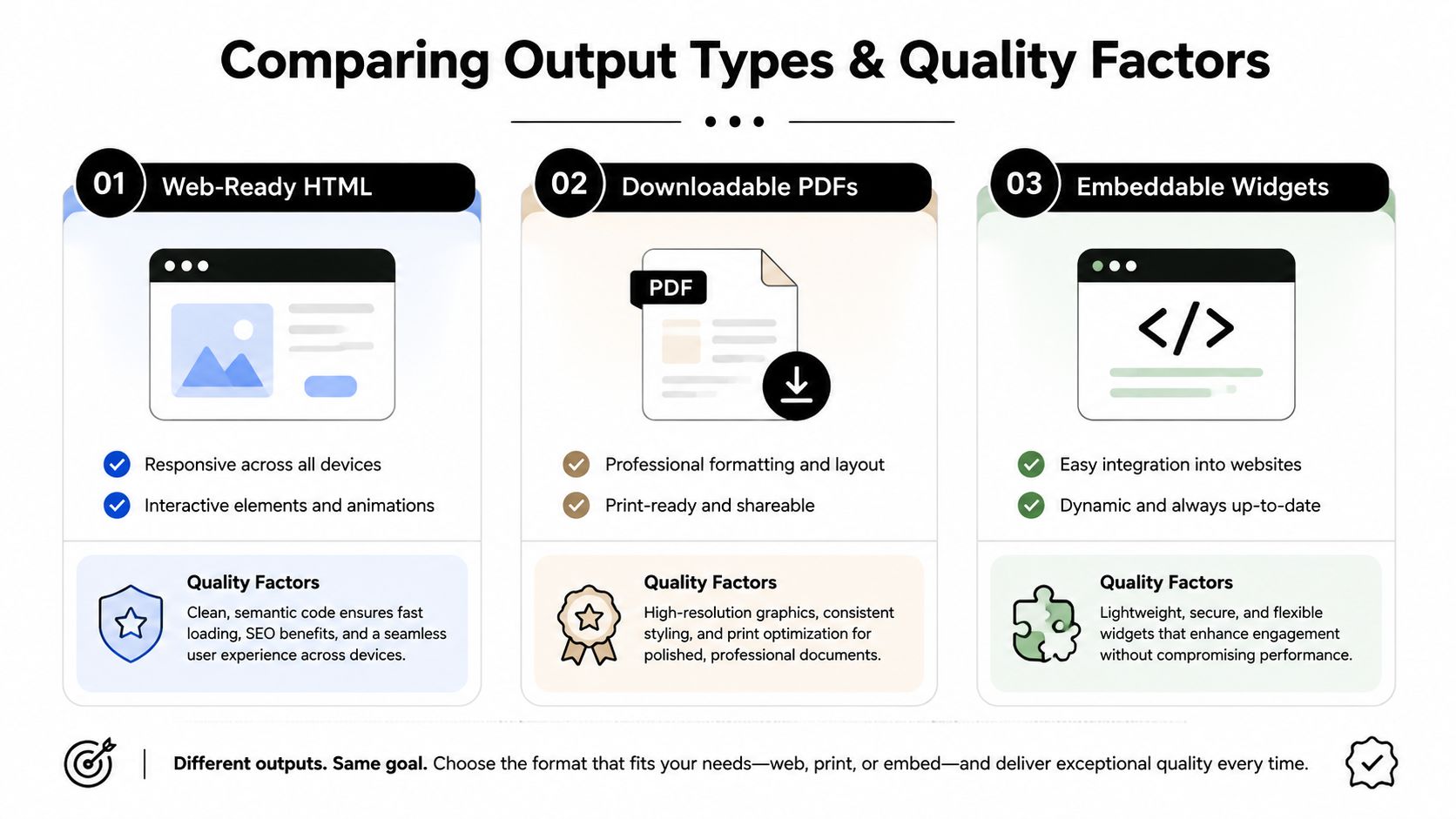
Different outputs solve different problems, and too many teams pick the wrong one for the job. A web-ready HTML case study is the best fit when the goal is search visibility, fast reading, and easy embedding on a landing page. A downloadable PDF works better when a sales rep wants to attach a polished asset to a deck or email thread. An embeddable widget is usually the most practical choice when the page itself should carry the proof, especially on homepages, product pages, and testimonials sections.
The difference isn't just format. It's control. HTML lets you adapt the layout, reinforce brand voice, and keep the story indexed. PDFs are fixed and presentation-friendly, but they're less flexible once published. Widgets sit in between, because they're easy to install and update, but they still depend on how well the widget is designed and maintained. ZenX Testimonials, for example, includes an embeddable Wall of Love widget and a case study generator that can draft from testimonials and export to PDF or publish, which shows how these output types are increasingly packaged inside one workflow rather than treated as separate tools.
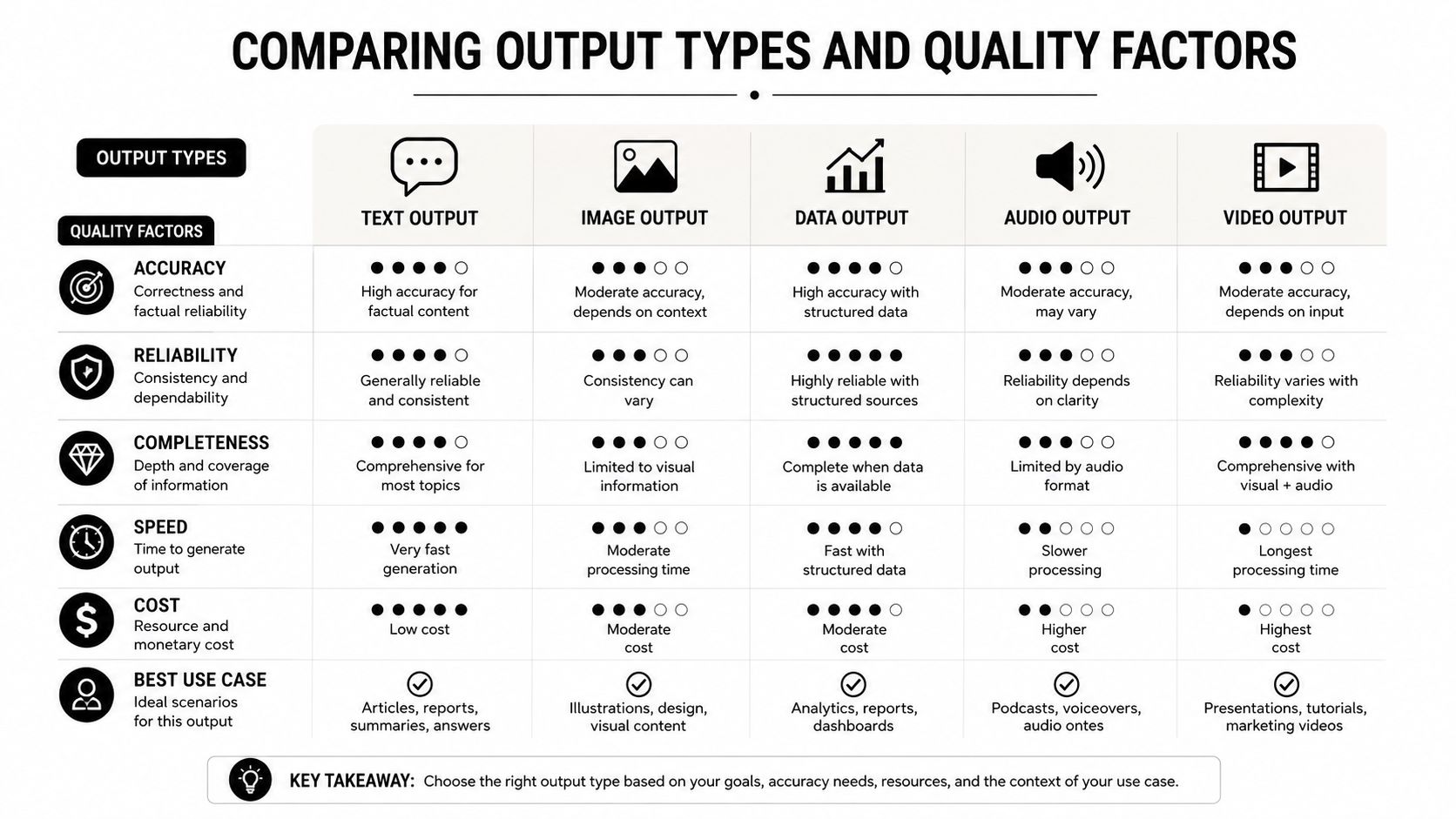
| Output type | Best use case | Watch out for |
|---|---|---|
| Web-ready HTML | SEO posts, landing pages, reusable proof pages | Weak formatting and poor mobile rendering |
| Downloadable PDF | Sales decks, client approvals, internal review | Static content that's harder to update |
| Embeddable widgets | Homepage proof, product pages, reusable social proof | Limited narrative depth if the widget is too short |
Quality factors that matter more than polish
- Narrative coherence. The story needs a clear beginning, middle, and result, not just a list of features.
- Metric accuracy. Every result has to trace back to a real source, especially if the generator is pulling from multiple testimonials.
- Brand voice consistency. The draft should sound like your company, not like a generic content bot.
- Visual polish. Formatting should support the story, not distract from it.
- Publishing fit. The output has to match the channel, because a sales PDF and an SEO page have very different jobs.
A generator can be fast and still be wrong for your use case. The winning move is picking the format that matches the distribution channel before you worry about how elegant the prose sounds.
Step-by-Step Workflow for Generating Case Studies from Testimonials
The cleanest workflow starts before the AI writes a single sentence. First, pick testimonials that already contain a clear customer, a real problem, and at least one verifiable result. A quote that says “great service” is nice for a review page, but it usually won't carry a case study unless you can add the missing business context from a source like a call note, CRM record, or support thread. If you want a reliable input pattern, this guide on how to write a testimonial is a useful reference point for what good testimonial capture looks like in the first place.
A workflow that actually holds up
- Select the source material. Choose one testimonial, one client note set, or one project summary. Don't mix unrelated wins in the same draft.
- Extract the factual spine. Identify the customer, the challenge, the solution, the result, and any supporting quote.
- Write the prompt around evidence. Tell the generator what to include, and tell it what not to invent.
- Review for missing facts. If a metric, date, or proper noun isn't confirmed, leave it out or mark it as a placeholder.
- Edit for tone and flow. Make the story sound like your brand, not like a template.
- Approve and export. Publish only after a human has checked the final narrative against the source material.
A prompt that works well is direct and bounded. Something like, “Turn this customer testimonial into a case study with the customer, challenge, solution, and results. Use only the facts provided. If a metric is missing, leave a placeholder.” That style works because it keeps the AI inside the evidence you already have.
Rule of thumb: a good prompt doesn't ask the model to be clever, it asks it to be disciplined.
Handling incomplete input
Incomplete testimonials are normal. A lot of them mention the outcome without enough context, or they praise the team without giving a measurable result. In those cases, the AI should draft only the part you can prove, then stop. The safest way to scale is to build a review habit where missing details get fixed upstream, not patched into the draft after the fact.
HubSpot's case study management guidance is helpful here because it limits a case study record to up to four success metrics and up to four testimonials. That structure shows how quickly a case study can become unwieldy if you try to cram in every quote and every metric. HubSpot's case study management guidance also reinforces that the evidence should stay structured, not scattered.
A workable monthly rhythm is simple. Batch the source material, draft from the strongest evidence first, then route every piece through the same verification pass before it goes live.
Evaluation Checklist for Choosing the Right Generator
The wrong generator saves time at the prompt stage and wastes it later in editing. A strong case study generator should make it easy to supply structured inputs, preserve your brand voice, and export in the format you publish. If a tool only produces generic paragraphs, it's not really solving the problem, it's just moving the manual work downstream.
What to check before you commit
- Input flexibility. Can it accept customer names, custom fields, and multiple evidence types, or does it force everyone into the same shallow form?
- Template quality. Does the narrative structure support customer, challenge, solution, and result, or does it flatten everything into generic marketing copy?
- Export options. Can you get the draft into PDF, a webpage, or an embeddable block without extra reformatting?
- Brand customization. Can you control logos, colors, headings, and layout so the final piece doesn't look off-brand?
- Verification features. Does the tool help you protect against invented metrics, unsupported claims, or misquoted customers?
- Integration fit. Can it work with your testimonial library, CRM, CMS, or publishing workflow?
A lot of teams underestimate the verification layer because they assume AI output is automatically close enough. It isn't. Junia's case study generator guidance, along with MultipleChat's similar advice, explicitly says the draft still needs human review, factual verification, and confirmation of numbers and proper nouns before publishing. That's the market gap in plain view, speed is easy to sell, defensibility is harder. Junia's case study generator guidance is useful precisely because it admits that review still matters.
What to test in a live sample
Try one real testimonial, not a polished sample. Watch for three failure modes: the draft gets generic, the names drift, or the results sound stronger than the source material supports. If any of those show up, the tool is optimizing for output volume instead of publishable truth.
Mailchimp's case study guide is useful as a benchmark here because it tells writers to document the challenge, solution, and measurable results, and to collect before-and-after data and enough context about the client's industry, size, and situation for readers to judge the result. Mailchimp's case study guide makes the evaluation standard pretty clear, a good generator should help you preserve that context, not wash it out.
The simplest decision filter is this. If the tool helps you publish faster without sacrificing evidence quality, it's worth a serious look. If it makes the draft look finished before it's verified, it's creating risk.
Integrating Testimonial Capture with Case Study Publishing
A generator works better when testimonial capture and publishing live in the same system. If reviews sit in Google, Yelp, email threads, and direct submissions, every case study starts with cleanup. Centralized capture changes that first step because the evidence is already organized, tagged, and ready to shape a draft.
The difference shows up in verification. A workflow built around capture can hold the source material in one place, keep the original wording visible, and make it easier to catch a quote that has been shortened too far or a result that has been stretched beyond what the client said. ZenX Testimonials centralizes video, audio, and text feedback, then uses AI Review Insights to extract themes, cited answers, and quote pulls. It also supports structured forms through smart forms, smart tags, and a case study generator that can draft from testimonials and export or publish, which makes it easier to move from social proof collection to publication without rebuilding the process every time.
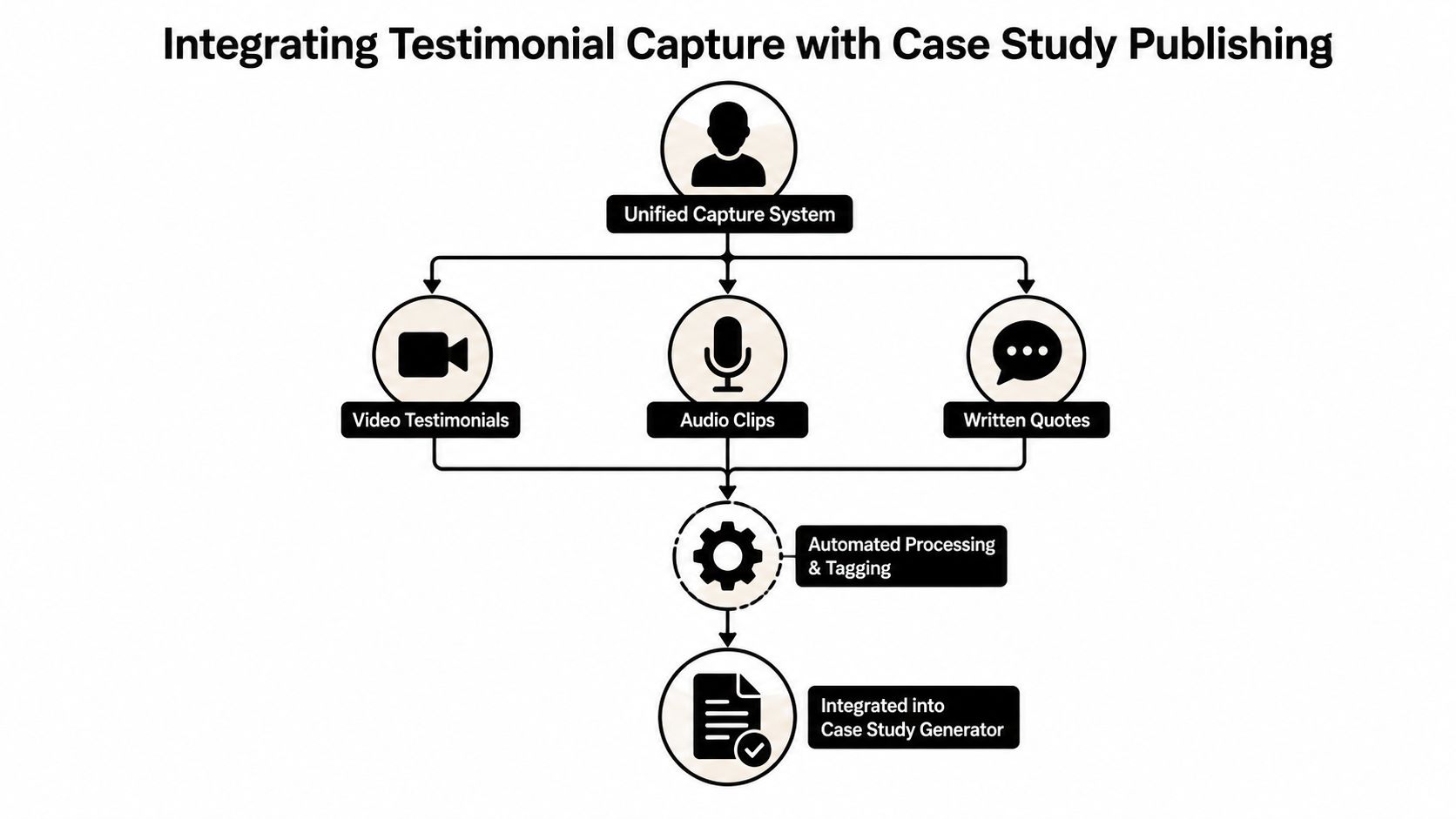
The capture to publish loop
- Video testimonials give richer context and more natural language.
- Audio clips lower friction for customers who will not write long responses.
- Written quotes stay easy to scan and repurpose across channels.
- Automated tagging helps the right quote surface when a marketer starts a new draft.
- Publishing outputs should match the channel, whether that is a page, a widget, or a branded PDF.
The other layer is SEO. Clean titles still matter because publishable case studies need to be discoverable, not just attractive. Structured markup and clear page titles help the story travel beyond the sales deck, and that matters if you want the asset to support both search and conversion. Adobe's case study guidance is useful here because it ties the format back to story structure and title discipline without asking the writer to overcomplicate the process. Adobe's case study guidance
The strongest pipeline starts at the moment a customer sends a testimonial. Once capture, tagging, drafting, and publishing are linked, the case study stops being a special project and starts becoming a repeatable content system.
Making Verification the Core of Your Case Study Workflow
The fastest draft in the world is useless if it invents a metric or misquotes a client. Verification has to sit in the workflow as a required step, not a polite suggestion after the AI finishes writing. That means checking every number against the source, confirming proper nouns and dates, and getting approval from the client or account owner before anything goes live. Junia's AI review insights fit into that mindset because the value isn't just drafting, it's pulling evidence you can trace back to the source.
The business case is straightforward. Defensible case studies build trust because readers can tell the story was assembled from real customer evidence, not generated from vibe and optimism. They also protect the brand when someone asks for the source behind a claim. If the answer is already documented, the asset can keep working for sales, SEO, and customer marketing without creating avoidable risk.
ZenX Testimonials gives you a way to collect video, audio, and text testimonials, organize them, and turn them into case study drafts that can be edited, approved, and published. If you're trying to move faster without letting accuracy slip, start by reviewing your testimonial workflow and then visit ZenX Testimonials to see how the capture, review, and publishing pieces fit together.
Written by
Sunil
ZenX Testimonials
Sunil writes about reviews, testimonials, and the everyday work of earning customer trust.