Customer Feedback Collection: Your End-to-End Playbook
An end-to-end playbook for customer feedback collection: channels, timing, questions, and turning feedback into reviews and fixes.
In this article
- Why Most Feedback Programs Collect Dust
- Set the Decision Before You Pick a Channel
- Choosing the Right Mix of Capture Channels
- Designing Capture Flows That Actually Convert
- Moderation, Tagging, and Publishing Workflows
- Turning Raw Feedback into Decision-Ready Insight
- Measurement, Optimization, and a 30/60/90 Rollout
Only 1 in 26 customers who have a bad experience complain, while about 91% of unhappy customers stay silent and leave instead of raising a hand, and that changes the whole job of customer feedback collection. The point isn't to gather polite opinions for a dashboard. The point is to catch the problems customers won't announce, before churn and distrust harden into a pattern, because the same research set ties asking for feedback to stronger loyalty and better retention economics.
Why Most Feedback Programs Collect Dust
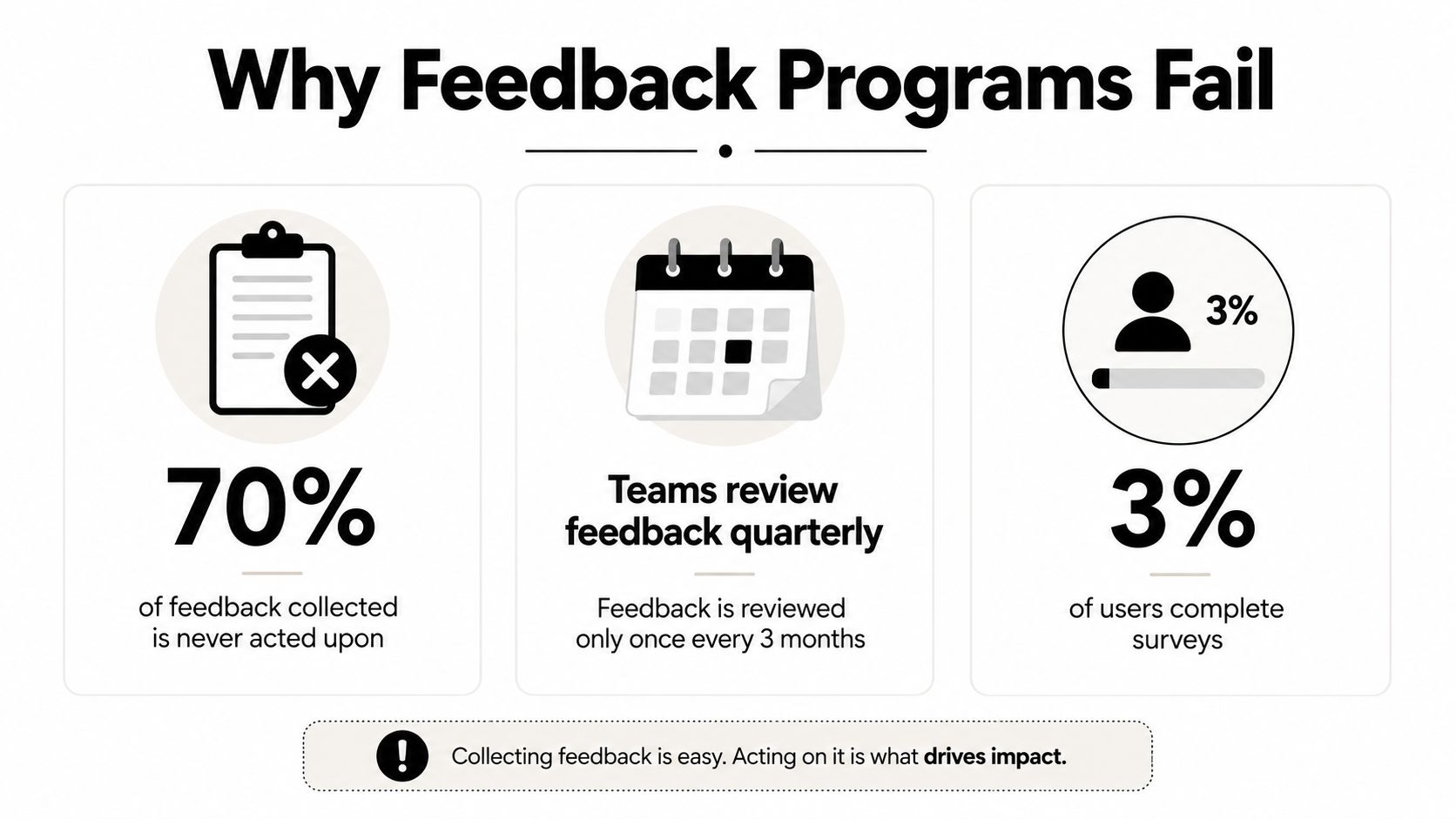
Most feedback programs fail for a simple reason, they're built like rituals instead of systems. A team sends a quarterly survey, checks a box, and then wonders why the inbox fills with comments nobody can prioritize. The problem isn't lack of sentiment, it's lack of detection, because silence is the default behavior for unhappy customers, not complaint.
That's why the silent dissatisfaction benchmark matters so much. If only 1 in 26 dissatisfied customers complain, then a passive program will miss most negative signals by design, and the business will learn about friction too late. The same research set says 77% of customers feel more loyal to brands that ask for and act on feedback, and a 5% increase in retention can lift profits by 25% to 95% when the loop closes, both cited in the customer feedback statistics reference.
What good programs do differently
A useful program treats feedback as a detection system. It asks, “What decision does this need to inform?” instead of “How many responses can we collect?” That shift changes everything, because a response becomes valuable only when it can be tied to a product area, journey stage, issue type, or customer segment, then acted on quickly.
Practical rule: if a comment can't change a decision, it's not insight yet.
That mindset also exposes a common failure mode, collecting for the sake of visible activity. Teams celebrate survey volume, then let comments sit untouched, which trains customers to stop contributing. The result is predictable, they go silent, and the business loses the chance to intervene before a support issue, onboarding snag, or service problem becomes churn.
Feedback works when it is proactive, low-friction, and acted on fast. Anything else turns collection into theater. The strongest programs don't ask customers to volunteer their pain on command, they build repeatable moments where signals can surface naturally, then route those signals into a clear owner and a real next step.
Set the Decision Before You Pick a Channel
Every feedback program should start with a written decision statement. If that is not on paper, the team ends up debating tactics instead of outcomes. I have seen too many SaaS, ecommerce, and local service teams start with email, SMS, QR, or in-product prompts, then realize they never defined the business question in the first place.
Write the decision brief first
A strong brief is short and blunt. It names the decision, the owner, the customer population, and the action the team expects to take if a pattern shows up. It also defines the KPI set that will show whether the program is healthy, not just busy.
A practical one-page brief usually covers:
- Decision to inform: product fix, service coaching, landing page revision, or testimonial selection.
- Owner: the person accountable for review and escalation.
- KPIs: response rate, time to first response, theme coverage, and whether the feedback led to an action.
- Segments: product area, journey stage, customer type, or location.
- Source mix: solicited comments and unsolicited signals in one place.
Centralized workflows matter. Guidance on how to collect customer feedback recommends combining qualitative and quantitative inputs, tagging responses with metadata, and centralizing channels into one repository before sorting them into themes. That structure keeps comments from becoming isolated anecdotes.
Choose KPIs that map to action
A KPI should answer a practical question, not decorate a report. If the team wants faster triage, measure time to first response. If it wants broader coverage, measure how many major themes show up in the month's intake. If the goal is to validate customer sentiment by cohort, segment the responses and compare patterns across groups.
A good feedback KPI tells you whether the program is creating decisions, not just data.
Ownership matters just as much as measurement. Pendo's guidance on collecting feedback inside the product warns that feedback should not go into a black hole, and that teams need a clear process to collect, prioritize, and manage it before they start gathering it Pendo's guidance on collecting feedback inside the product. That is the operating model, a named owner, a defined decision, and a path from comment to action. Without that, every channel eventually becomes a dumping ground.
A program also needs one capture point that can sit close to the moment of action. In practice, that is where an embedded widget helps, because it lets teams collect responses near the page, feature, or step that triggered the reaction. A well-placed embed widget keeps the ask tied to the decision layer instead of turning feedback into a detached survey ritual.
Choosing the Right Mix of Capture Channels
Teams usually overuse email because it's familiar, then underperform because it's intrusive. The better approach is to choose channels based on friction, authenticity, and downstream use. Those three lenses keep the portfolio honest.
| Feedback channels compared | Friction | Best For | Watch Out For |
|---|---|---|---|
| Video | Low when browser-based, especially for quick stories | Rich testimonials, emotionally resonant proof, and sales pages | Needs clear prompts or it can drift into rambling |
| Audio | Low on mobile and fast for on-the-go users | Short reactions, field-service follow-ups, and quick qualitative capture | Harder to skim than text |
| Text | Lowest when structured well | Specific issues, categorized responses, and fast analysis | Weak prompts lead to thin answers |
| Review imports | Very low because customers already left the feedback | Unsolicited sentiment and public proof | Public reviews need sorting and moderation |
The practical takeaway is simple. Use video when you need nuance and trust. Use audio when speed matters and the customer is on a phone. Use structured text when you want analysis-friendly detail. Bring in Google and Yelp reviews when you need the unsolicited layer that your own request flow won't capture.
Layer channels instead of repeating prompts
Channel layering prevents fatigue. A customer shouldn't get the same question by email, then again in a widget, then again in a follow-up SMS. The collection system should route different customers to different moments, based on what they've done and what decision you're trying to inform.
That's why browser-based capture matters. ZenX Testimonials supports collection through embedded forms and a widget-style capture flow, which fits teams that want to keep the response moment close to the buying or service experience. In practice, that means fewer handoffs, less friction, and less chance that the customer drops out before finishing.
The win is not channel variety for its own sake. It's fit. If the channel doesn't match the decision, the response will either be too hard to collect or too weak to use. A portfolio approach gives you both coverage and quality without forcing every customer into the same form.
Designing Capture Flows That Actually Convert
Timing determines whether feedback feels relevant or annoying. Ask too early and the customer hasn't formed an opinion. Ask too late and the memory is gone. Best-practice guidance says feedback should be requested at a relevant touchpoint, immediately after an interaction when recall is fresh, but only after enough time has passed for a real judgment to form in the methodology guidance.
Put the request where the work happens
Pendo's guidance is blunt, feedback belongs inside the product, not in an email that pulls users out of their workflow here. That logic holds in ecommerce and local services too. People respond better when the prompt appears at the moment the experience still matters, not after they've been forced into another tab or inbox.
For post-purchase evaluation, Qualtrics says the prompt should go out within 24 hours of the engagement, and it identifies periodic satisfaction surveys as occasional snapshots, such as an annual survey, with continuous tracking handled on a daily, monthly, or quarterly cadence on this guide. Those cadences work because they match the type of question being asked, not just the channel available.
Use short templates that don't fight the moment
A few practical request patterns work well:
- Email after purchase: “Thanks for your order. What stood out, good or bad, about the experience?”
- SMS after service completion: “Quick question, how did the visit go today, and what should we improve?”
- QR on receipts or packaging: “Scan to leave a short note about what went well and what didn't.”
The questionnaire itself matters just as much as the trigger. Best practice warns against double-barrelled, leading, and jargon-heavy questions, and recommends keeping surveys short, offering optional responses, and using incentives carefully because too many asks can create survey fatigue and reduce answer quality as noted in the methodology source.
Keep the form short enough that a tired customer can finish it without thinking about it.
For teams that want structured collection without a lot of build work, ZenX Testimonials also supports smart forms that can shape the request around the response. That's useful when a lower rating should route into a different follow-up than a positive one.
The operational test is simple. If the flow feels like a detour, it will underperform. If it feels like part of the experience, response quality rises and the feedback is easier to trust.
Moderation, Tagging, and Publishing Workflows
Capturing a response is only the first gate. The more operationally useful work starts after intake, when someone has to decide what to keep, what to reject, what to tag, and what to publish. Without that layer, feedback turns into a growing pile of files nobody wants to own.
Build a moderation line, not a free-for-all
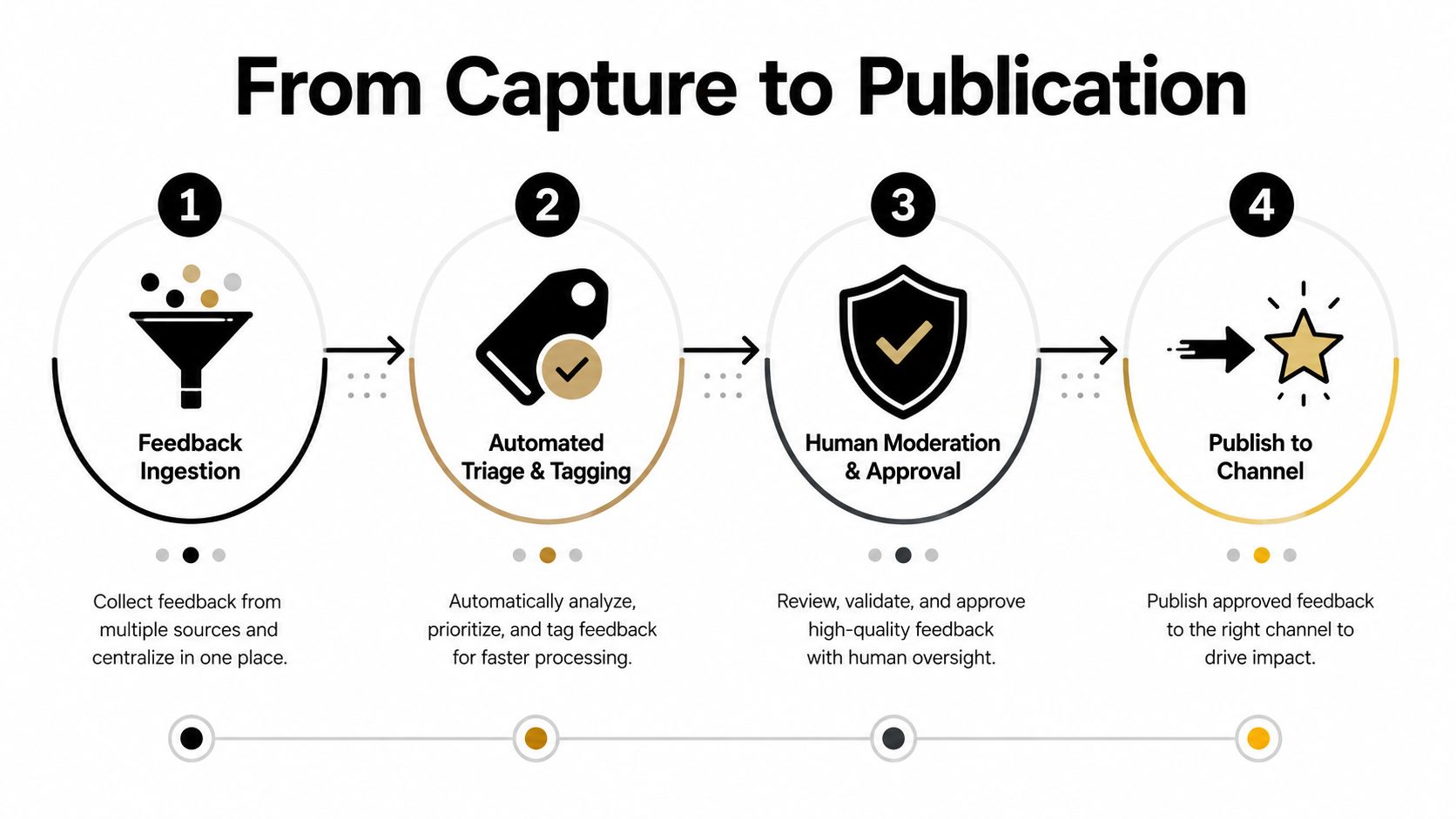
A clean moderation workflow usually runs in four steps. First, ingest the submission. Second, triage it for relevance and quality. Third, apply tags and notes. Fourth, publish it to the right surface, whether that's a website widget, a case study, or a sales page.
That line works because each step has a different purpose. Triage protects the brand and the dataset. Tagging makes the feedback searchable. Publishing turns the approved item into a working asset instead of a parked comment. Teams that skip the middle usually end up with a wall of raw responses that never make it into a customer-facing surface.
Use tags to separate proof from noise
Tagging should be consistent enough that a manager can sort by campaign, product area, sentiment, or use case without re-reading everything. Smart tags and filters make that much faster, especially when a team is reviewing a mixed stream of video, audio, text, and imported reviews. Bulk actions help too, because the volume usually spikes after a campaign or an event.
The publishing side matters just as much. ZenX Testimonials can centralize moderation, approval, and bulk actions, then publish approved items into an embeddable Wall of Love. That's useful when feedback needs to move from collection to visible proof without living in a spreadsheet.
Workflow rule: no item should be publishable unless it has an owner, a tag, and a reason for approval.
The best moderation teams also keep notes on rejection. A polite “not a fit for public use” is enough. That preserves trust with the submitter and keeps the repository clean. It gives the team a named process so publishing becomes routine rather than a quarterly scramble.
Turning Raw Feedback into Decision-Ready Insight
A tagged spreadsheet is still not insight. It is organized backlog. The analysis step turns raw comments into something a team can act on, and the order matters. Start with the comments and the metadata together, then sort into categories, then count what repeats.
Collapse comments into themes and codes
A practical analysis method starts by collating open-ended feedback with customer metadata, then categorizing it by feedback type, feedback theme, and feedback code. Count how often each code appears by sorting the spreadsheet alphabetically and grouping repeated codes. That turns qualitative text into frequency the team can compare without guessing.
The method works because it forces discipline. A single emotional comment stops driving the conversation. The team can see what repeats across customers, products, and time periods, then separate a billing concern from an onboarding confusion point or a feature request. Those are different decisions, and they should not be forced into one bucket.
Use AI as an assistant, not the authority
For teams with a large mixed library of testimonials and reviews, AI Review Insights can help extract themes, pull quotable lines, and surface phrases that deserve a second look. That is useful when sales or marketing needs publishable proof, while product or support needs the operational patterns underneath. Provenance still has to stay visible, because the original context is part of the insight, not something to strip out during summarization.
Public competitor reviews can also be clustered to show where your offer is winning or lagging relative to alternatives. That does not replace internal feedback. It gives the team an external mirror when positioning or service quality is under pressure, and it helps separate isolated complaints from repeated market signals.
You can see the workflow in AI Review Insights, where theme extraction and quote retrieval support both the review layer and the testimonial layer. Used well, the output becomes a short list of fixes, a short list of publishable proof points, and a weekly habit of turning noise into priorities.
The rule is simple. If the analysis cannot change a roadmap, a coaching plan, or a publish decision, it is not finished yet.
Measurement, Optimization, and a 30/60/90 Rollout
A feedback operation only compounds when it gets measured the same way every month. The dashboard should be plain, not fancy, and it should answer four questions, are people responding, are responses moving quickly, are themes being covered, and is the published proof showing up where it should?
Build the rollout in three phases
A 30/60/90 rollout keeps the work realistic.
- First 30 days: define the decision brief, choose the channel mix, and assign ownership for intake, moderation, and analysis.
- By 60 days: launch the capture flows, tag the first batch consistently, and review the themes that are starting to repeat.
- By 90 days: tighten the copy, adjust the timing, and connect the approved feedback to published surfaces or operational fixes.
That sequence works because it forces learning before scale. The first month is about structure. The second is about quality. The third is about making the loop visible to the rest of the team.
Protect trust while you optimize
Low-friction channels like video, SMS, QR, and in-product prompts only work if customers understand how their responses will be used. So the privacy layer can't be an afterthought. Teams need clear transparency, region-aware compliance thinking, and the lowest practical consent friction that still respects the customer.
If the request feels sneaky, response quality drops even when volume looks fine.
Optimization should be monthly, not annual. Test one variable at a time, prompt timing, question order, or channel mix, and compare what changes in response quality, not just response count. Escalate a theme when it starts to repeat across segments, affects a key journey, or shows up in both solicited and unsolicited channels.
The compounding effect comes from consistency. Each cycle should make the next one easier to run, faster to moderate, and more useful to the business. That's what turns customer feedback collection into an operating system instead of a one-off project.
ZenX Testimonials helps teams collect, moderate, and publish testimonials and reviews from one place, with video, audio, text, and review imports in the same workflow. If you want to connect feedback capture to a visible publishing process, visit ZenX Testimonials and see how the intake, moderation, and embed pieces fit together.
Written by
Sunil
ZenX Testimonials
Sunil writes about reviews, testimonials, and the everyday work of earning customer trust.