10 Best Feedback Form Templates for 2026
Ten feedback form templates for 2026 with the exact questions to use for customers, products, events, and services.
In this article
You're staring at a blank form, trying to decide which questions matter and which ones will just annoy people into abandoning it. That's exactly where feedback form templates earn their keep, because the right structure helps you collect usable insights without making customers, guests, or employees work too hard. The best ones don't just ask, “How did we do?” They shape the response around a specific business problem, whether that's post-purchase friction, product research, event follow-up, or customer sentiment.
The market has also matured. Jotform now lists 2,400+ feedback forms in its feedback category and 10,000+ feedback form templates overall, which shows how much of this work has shifted from custom builds to reusable systems (Jotform feedback templates). That matters in practice, because modern feedback collection is rarely a one-off survey. It's part of an operational workflow that can live on a landing page, in email, in a widget, or inside a review request flow.
The best tools in this space solve different jobs. Some are built for polished, conversational surveys. Others are better for internal teams, fast launches, or compliance-heavy workflows. If you want the shortest route to the right fit, use the list below as a problem-solving library, not a generic directory.
1. ZenX Testimonials
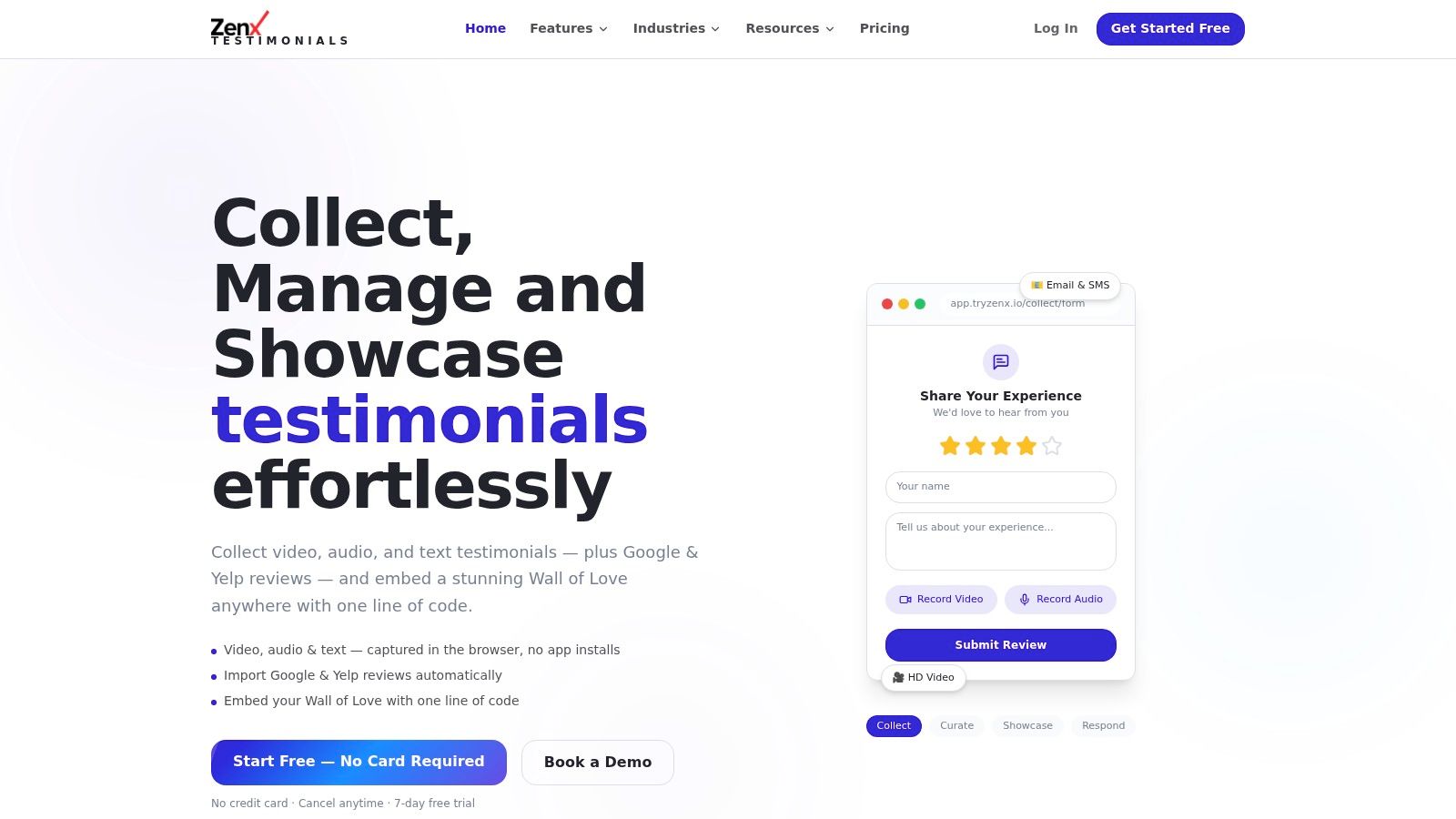
ZenX Testimonials is the most persuasive option on this list if your real goal is to turn feedback into visible trust. It combines browser-based HD video, mobile-friendly audio, and structured text capture in one place, then publishes the results in a responsive Wall of Love widget that installs with a single line of code. For SaaS teams, agencies, e-commerce brands, and local service businesses, that mix is useful because it moves customer praise from a private inbox into a public conversion asset.
Why it works when standard feedback forms stall
The main trade-off is simple. Most feedback tools collect responses, but ZenX helps you publish them. Built-in outreach through email, SMS, and QR, plus auto-follow-ups, lowers the effort needed to get a response. Smart forms and star-gating help route happy customers toward public reviews while private complaints stay out of the spotlight, which is exactly how you protect the customer experience without weakening your social proof strategy.
Practical rule: use ZenX when the feedback you want should be seen by prospects, not just stored in a spreadsheet.
It also fits teams that want to reduce manual curation. AI-powered moderation, Review Insights, competitor analysis, case study generation, and Google Review alerts with AI-suggested replies make the workflow broader than a normal testimonial collector. The biggest upside is that everything sits in one dashboard, including imported reviews from Google and Yelp, so your team isn't stitching together screenshots and text exports by hand.
ZenX's public setup is also low-friction. It starts free, requires no credit card, and includes a 7-day free trial. Public pricing tiers aren't listed, so buyers should expect to start with the product experience first and evaluate plans later. For teams that care about SEO-friendly social proof, fast setup, and no-install capture flows, that's a very practical trade-off. Visit the platform at ZenX Testimonials.
2. Typeform
Typeform makes sense when the feedback request itself is part of the brand experience. Its conversational, one-question-at-a-time flow helps forms feel less like admin and more like a guided interview, which is why it works well for product feedback, event feedback, demo follow-up, CSAT, and NPS. The library is large, with 1,500+ templates, and the builder supports 20+ question types, logic branching, embeds, share links, and integrations (Typeform).
Best use case and the main trade-off
Typeform is strongest when response quality depends on perceived polish. If you're asking customers to describe an experience in detail, or if you want the form to feel on-brand enough that people finish it, the UI does a lot of heavy lifting. AI-assisted form building and open-text analysis also help teams move faster once responses start coming in.
The trade-off is cost and limits. Typeform is usually better suited to teams that can justify a premium tool, and lower tiers can come with monthly response caps. That makes it a good fit for high-value feedback flows, less so for high-volume, low-stakes collection.
The response experience is where this tool stands out most. It's not the deepest enterprise survey platform, and it's not the cheapest form builder, but it's excellent when the main objective is completion quality and brand perception. For teams comparing tools, the question is whether you want a survey utility or a polished customer conversation.
You can also pair a conversational survey with a friction-reduction playbook elsewhere in your stack. The smart-forms guidance at ZenX smart forms is a good example of the kind of routing logic that keeps question flow relevant without making the respondent work through irrelevant fields.
3. SurveyMonkey
SurveyMonkey is the safest pick when your team wants a mature survey system with enough structure to handle standardized feedback. It offers 400+ expert-written survey templates, including CSAT, NPS, employee feedback, and event feedback, along with shared template libraries, themes, multi-channel distribution, response tracking, advanced analysis, and export options (SurveyMonkey).
Where it beats lighter tools
This is the tool I'd reach for if research discipline matters more than visual novelty. Teams that need consistent wording across departments, or that want to keep template language aligned for brand and methodology reasons, benefit from the shared libraries and team themes. That matters more than people think, because inconsistent phrasing can make comparisons messy over time.
SurveyMonkey also scales well from a simple customer pulse to a more formal study. The question bank is deep, and the reporting side is much more developed than you'll get in lightweight form builders. That gives CX, product marketing, and operations teams more confidence when they need to summarize trends for leadership.
The downside is familiar. Feature gates and response caps can show up on lower tiers, and costs can rise when several people need access. If you need one survey tool for multiple teams, that can get expensive quickly. But if you want a library with enough depth to support standardized programs, this is still one of the most practical options.
For teams thinking about post-feedback action, the workflow guidance at ZenX's customer feedback resource is a useful reminder that collecting responses is only useful if your process turns them into decisions.
4. Jotform
Jotform is the best all-around option when your feedback needs vary across teams and use cases. It has 20,000+ form templates overall, including 2,400+ in the Feedback category, and its builder supports drag-and-drop layout, ratings, dropdowns, open-text fields, conditional logic, widgets, payments, approvals, reports, mobile apps, and app-building features (Jotform feedback templates, Jotform).
Why teams keep coming back to it
Jotform's biggest advantage is breadth. If you need a template for training, customer service, product feedback, or app feedback, chances are you'll find something close enough to adapt quickly. That saves time for teams that don't want to build every form from scratch.
The trade-off is complexity. Jotform can do a lot, and that means the interface can feel broad to new users. It's also the kind of platform where paid tiers matter if you care about branding removal or plan limits. For simple, single-purpose forms, that can feel like more tool than you need.
What makes Jotform especially relevant in 2026 is how well it reflects the modern template standard. The structure is familiar, choose a layout, add scales and fields, publish, and monitor responses in a dashboard. In practice, that makes it easy to treat feedback collection as an operational system rather than a custom project every time.
It's also a good fit when feedback is only one part of a larger workflow. If you need approvals, payment capture, or document handling alongside the survey, Jotform is far more flexible than a basic form tool.
5. Google Forms
Google Forms is still the best default option when the job is simple, the budget is tight, and speed matters. It comes with a built-in template gallery, real-time response charts, automatic export to Google Sheets, basic logic, file uploads, easy sharing, and collaborative editing. For quick internal feedback or lightweight public collection, that's hard to beat (Google Forms).
The tool for fast, low-friction collection
This is the form builder I recommend when the constraint is time, not sophistication. People already know the interface, so respondents usually don't need any explanation. That familiarity lowers resistance, which is valuable for internal teams, early-stage startups, and anyone collecting straightforward opinions without a lot of branding needs.
Google Forms isn't a design-led experience, and that's the point. It's plain, functional, and fast. If you need stronger visual customization, advanced workflow automation, or deeper analytics, you'll outgrow it. But if your goal is to get a form live today and see answers in Sheets tomorrow, it's still a very sensible choice.
The other strength is collaboration. Several people can work in the same form without the process getting messy, which helps when marketing, CX, or operations all need to weigh in. It's also ideal for use cases like event follow-up or internal pulse checks where visual polish doesn't matter much.
If you're choosing between free tools, Google Forms wins on familiarity and speed. If you need the form to feel like part of the brand, a more customized builder will do a better job.
6. Microsoft Forms
Microsoft Forms is the best fit for teams already living inside Microsoft 365. It offers a template gallery with feedback and satisfaction surveys, branching, themes, built-in charts, Excel export, and integrations with Teams and SharePoint. That makes it especially useful for organizations that care about governance and internal workflow control (Microsoft Forms).
Where it fits in a Microsoft-heavy stack
The appeal is integration, not flash. If your team already uses Excel for analysis, Teams for coordination, and SharePoint for sharing, Microsoft Forms drops into that ecosystem without friction. That reduces the need for extra onboarding and gives IT teams a platform they already understand.
It's a strong choice for post-event feedback, internal employee surveys, and standard satisfaction check-ins. The branching and charting are enough for many practical use cases, especially when the output is going to be read in a meeting rather than published in a report.
The trade-off is design flexibility. Microsoft Forms won't give you the same polished, branded feel you'd get from a dedicated survey builder, and the research features are limited compared with heavier platforms. But in a corporate environment, that's often an acceptable exchange for simplicity and control.
If your organization standardizes on Microsoft tools, this platform is usually the path of least resistance. It's not the most creative option, but it's one of the easiest to govern.
7. Tally
Tally is the best value play for teams that want a modern editor without paying for every small workflow. It offers unlimited forms and submissions on the free plan under fair use, along with logic, calculations, file uploads, signatures, native integrations, webhooks, custom domains, CSS, and branding options on Pro (Tally).
The best cheap option for fast builders
Tally feels closer to writing a document than assembling a form, and that's part of why people like it. The editor is fast, the interface is clean, and you can launch feedback forms without fighting the software. For startups and small teams, that means less time configuring and more time collecting responses.
The big advantage is the free tier. If you're running multiple lightweight forms or testing different feedback workflows, unlimited forms and submissions can be a real advantage. You don't have to keep policing volume while you're still validating the use case.
The trade-off is enterprise depth. Tally doesn't have the same governance layer or ecosystem breadth as older vendors, so larger teams may run into limits if they need more formal administration. Some advanced branding and analytics also sit behind Pro.
Tally works especially well for product teams, founders, and marketers who care about speed and budget. It's a good fit when you want a tool that feels lightweight without feeling toy-like.
8. Fillout
Fillout is a strong choice when you want your feedback forms to look modern without spending a lot of time on design polish. It has hundreds of templates across Feedback, Survey, and vertical categories, plus native integrations, prefill, conditional logic, payment and page support, and team plans with nonprofit and education discounts (Fillout).
Useful when the form needs to live on your site
Fillout is especially practical for embedded forms. The UI feels clean, responsive, and current, so it works well on landing pages, help centers, and in-product feedback flows. That makes it a smart pick for product teams that want something sleeker than a basic form without jumping into a heavyweight survey stack.
The template gallery is broad enough to cover customer feedback and website feedback without much rework. Prefill also helps reduce repeat friction, which is useful when you already know part of the respondent's context and don't want to ask them to retype it.
The downside is ecosystem size. Compared with older incumbents, the add-on universe is smaller, and higher response caps or branding removal may require paid tiers. Still, for teams that value speed and clean UX, those trade-offs are usually acceptable.
If your feedback form is part of a digital experience, not just an admin process, Fillout is one of the more attractive options.
9. Paperform
Paperform is the best choice when feedback needs to feel branded, detailed, and a little more structured than a normal survey. It has 30,000+ templates, including dedicated categories for Feedback & Evaluation, CSAT, and research use cases, plus calculations, pricing rules, payments, booking, appointments, e-sign support, theming, and custom domains on higher plans (Paperform).
Strong for long-form and mixed workflows
Paperform shines when the feedback process is more than a questionnaire. If you need to mix survey logic with commerce, quoting, or appointment flows, it can handle that without forcing you into multiple tools. That's useful for SMBs, agencies, consultants, and service businesses that want one branded entry point.
The template library is also broad enough to support different styles of feedback, from short pulse forms to more involved evaluation flows. If you're collecting deeper qualitative input, the document-style layout can feel more natural than a stacked, rigid survey.
The trade-off is weight. For very simple needs, Paperform can feel like more tool than necessary. Advanced branding and domain features also cost extra, so the best experience isn't always the cheapest one.
For teams that want feedback to look like part of the customer journey, not a detached survey, Paperform is one of the better fits.
10. Formstack Forms
Formstack Forms is the enterprise-friendly option for feedback collection in regulated or process-heavy environments. Its template library includes Restaurant Customer Feedback and 360-Degree Feedback, and the platform adds 256-bit SSL, encryption, HIPAA and PCI options, prefill, dynamic population, workflow automations, and suite integrations with Documents and eSign. It also has a Salesforce-native variant (Formstack).
Built for governance, not just collection
This is the form builder I'd choose when compliance and workflow control matter more than a pretty interface. If your organization needs formal data handling, secure routing, or feedback that feeds into other business systems, Formstack has the infrastructure to support that.
The main upside is that it doesn't stop at form capture. Prefill, dynamic population, and workflow automation make it easier to route responses into the right process. That's especially helpful in healthcare, legal, finance, and other environments where feedback often triggers follow-up actions.
The trade-off is cost and complexity. Formstack is more enterprise-oriented than lightweight builders, so smaller teams may find it heavier than necessary. But if your feedback process sits inside a regulated operation, that weight is often a feature, not a flaw.
For teams that already rely on Salesforce or need formal security controls, this is one of the strongest options available. The embed guidance at ZenX embed widgets is also a useful reference point for how tightly integrated social proof and feedback can be on high-intent pages.
Top 10 Feedback Form Template Tools: Comparison
| Product | Core features (✨) | UX / Quality (★) | Value & Pricing (💰) | Target audience (👥) | Unique selling points (✨/🏆) |
|---|---|---|---|---|---|
| ZenX Testimonials 🏆 | In-browser HD video, mobile audio, structured text, Google/Yelp import, Wall of Love widget, AI moderation | ★★★★★ frictionless capture, SEO-friendly widgets | 💰 Free start + 7‑day trial; paid tiers by contact | 👥 SaaS, e‑commerce, agencies, marketing, local services, course creators | ✨ No-install HD recorder, one-line embed, exportable data, AI Review Insights |
| Typeform | Conversational forms, 1‑question UX, 1,500+ templates, AI-assisted building | ★★★★ high completion & brand polish | 💰 Paid plans; higher cost for heavy use | 👥 Marketing teams, product teams, brands | ✨ Conversational UX, strong design/templates |
| SurveyMonkey | 400+ expert templates, multi-channel distribution, advanced analysis | ★★★★ research-grade, team collaboration | 💰 Paid tiers; response/feature caps on lower plans | 👥 Research teams, large teams, enterprises | ✨ Deep analytics, team libraries |
| Jotform | 20,000+ templates, payments, approvals, HIPAA (higher tiers) | ★★★★ very flexible, steeper learning curve | 💰 Freemium; paid to remove limits/branding | 👥 SMBs, ops teams, payment/approval workflows | ✨ Payments, HIPAA support, extensive widgets |
| Google Forms | Template gallery, Sheets export, real-time charts, basic logic | ★★★ simple, minimal friction | 💰 Free with Google account | 👥 Internal teams, quick public surveys, educators | ✨ Instant Sheets integration, zero cost |
| Microsoft Forms | Templates, branching, Excel/Teams/SharePoint integration | ★★★ easy for M365 users | 💰 Included with Microsoft 365 | 👥 Organizations on Microsoft 365, IT-governed teams | ✨ Native M365/Excel workflows |
| Tally | Unlimited forms/submissions (free), logic, integrations, webhooks | ★★★★ fast editor, lightweight UX | 💰 Excellent free tier; Pro for branding/advanced | 👥 Startups, budget-conscious teams | ✨ Unlimited free submissions, quick setup |
| Fillout | Modern editor, embed-friendly, templates, prefill/logic | ★★★★ clean responsive forms | 💰 Freemium; paid for higher caps/branding | 👥 Product teams, websites, SMBs | ✨ Slick embeds, modern UX |
| Paperform | Document-style forms, calculations, commerce, large template library | ★★★★ rich features for long forms | 💰 Paid plans geared to SMBs needing commerce | 👥 SMBs needing complex scoring/commerce | ✨ Powerful calculations, payments & booking |
| Formstack Forms | Enterprise templates, HIPAA/PCI, SSO, workflow automations | ★★★★ enterprise-ready, compliance-focused | 💰 Higher entry price; enterprise pricing | 👥 Regulated industries, enterprise teams | ✨ Compliance (HIPAA/PCI), Salesforce-native options |
From Template to Action Using Feedback for Growth
Choosing the right template is only the first step. The forms that work best stay focused on one job, keep friction low, and respect the respondent's time. That means short wording, mobile-friendly layout, clear expectations, and a visible reason for why the person is being asked to respond. Zendesk recommends keeping feedback forms brief enough that users spend no more than 5 to 10 minutes completing them, and it also advises adding a progress bar or even a simple “2-minute survey” estimate because clearer expectations can improve completion rates (Zendesk feedback forms). Youform's guidance is even tighter, recommending forms be kept under 5 minutes and sent immediately after the experience, with personalization and mobile optimization as core design rules (Youform guidance).
The structure matters just as much as the timing. FormEpic recommends a seven-part feedback form framework, including an introduction, optional customer information, general questions, specific questions, additional comments, an optional incentive, and a closing. It also advises a mobile-first layout with explicit progress display, a maximum of one scroll per page, and input fields at least 44 pixels high to reduce mis-taps on touch devices (FormEpic feedback form guide). StarHQ adds another useful benchmark, recommending 5 to 7 questions and citing a Typeform internal benchmark from 2023 that says each question beyond seven reduces completion rates by roughly 5% to 10% (StarHQ feedback form template).
That's the practical reality behind the best feedback form templates. The winners aren't the longest or the most elaborate, they're the ones that make it easy to answer, easy to analyze, and easy to act on. In some cases, that means a clean survey in Google Forms or Microsoft Forms. In others, it means a branded conversation in Typeform, a workflow-heavy build in Jotform or Formstack, or a public-facing testimonial system like ZenX that turns feedback into visible trust.
If you want to improve response quality this week, pick one high-intent touchpoint, keep the form short, and make the next step obvious. Then close the loop by using the responses somewhere customers can see the result. If you're ready to turn customer stories into on-site proof, start with ZenX Testimonials and build your next feedback flow around it.
Written by
Sunil
ZenX Testimonials
Sunil writes about reviews, testimonials, and the everyday work of earning customer trust.